

Knowledgebases
A knowledgebase is a set of documents that agents and judges can read while they work. You’ll come to the Knowledgebases page to create one, or to open an existing one and manage its documents and links.
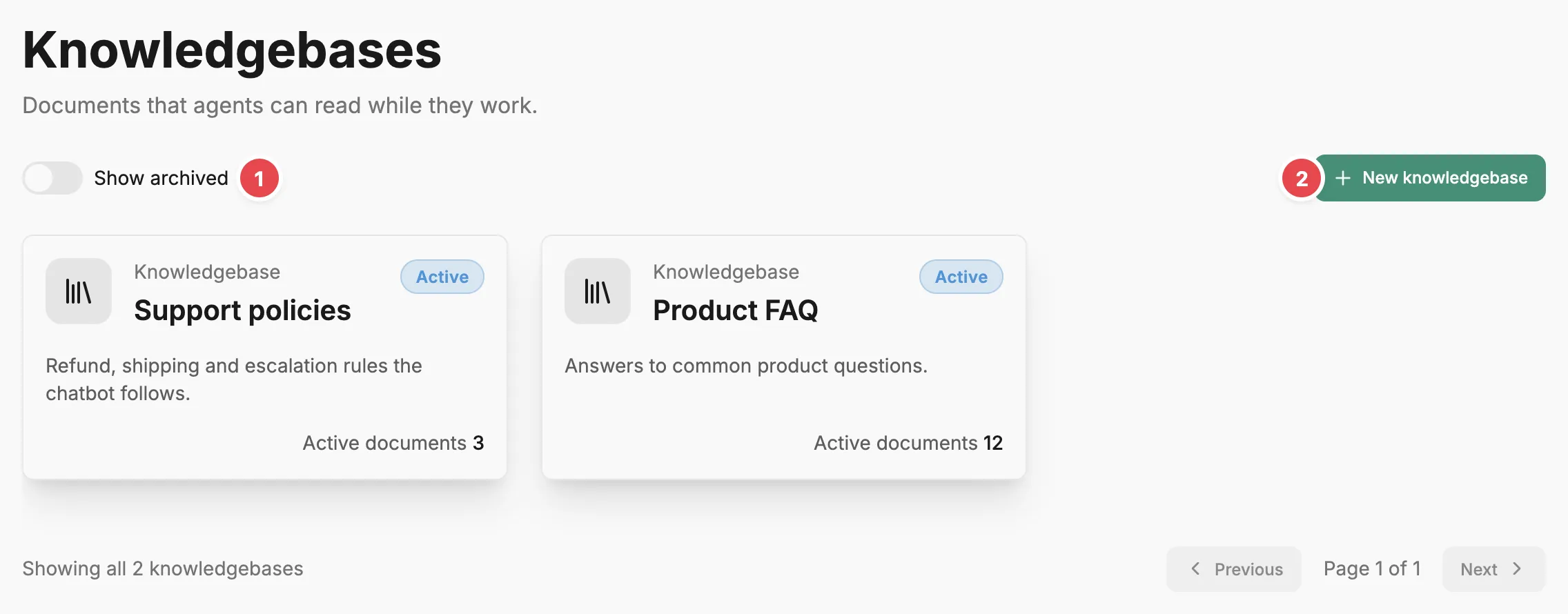
- Show archived - includes archived knowledgebases in the list.
- New knowledgebase - creates an empty knowledgebase.
Knowledgebase cards
Section titled “Knowledgebase cards”Each knowledgebase appears as a card with its name, description, status (Active or Archived), and its number of active documents. Select a knowledgebase’s name to open its Knowledgebase page. Archived knowledgebases are hidden until you turn on Show archived.
New knowledgebase
Section titled “New knowledgebase”New knowledgebase opens a dialog with a Name and a Description. Names must be unique in the account. Write the description for the agents as much as for people: agents see it as part of their tool descriptions, and use it to decide whether the knowledgebase is worth reading. Create knowledgebase adds it to the list. It has no documents and no links yet; open it to add both.
Related
Section titled “Related”- Knowledgebase — what a knowledgebase is, and how agents and judges read it.
- Knowledgebase page — add documents and link agents and judges.
- Give agents reference documents — create a knowledgebase and link it, step by step.