

LLM providers tab
An LLM provider holds the language model credentials that hosted judges run on. You’ll come here to connect a provider, add the models you want judges to use, and replace a key.
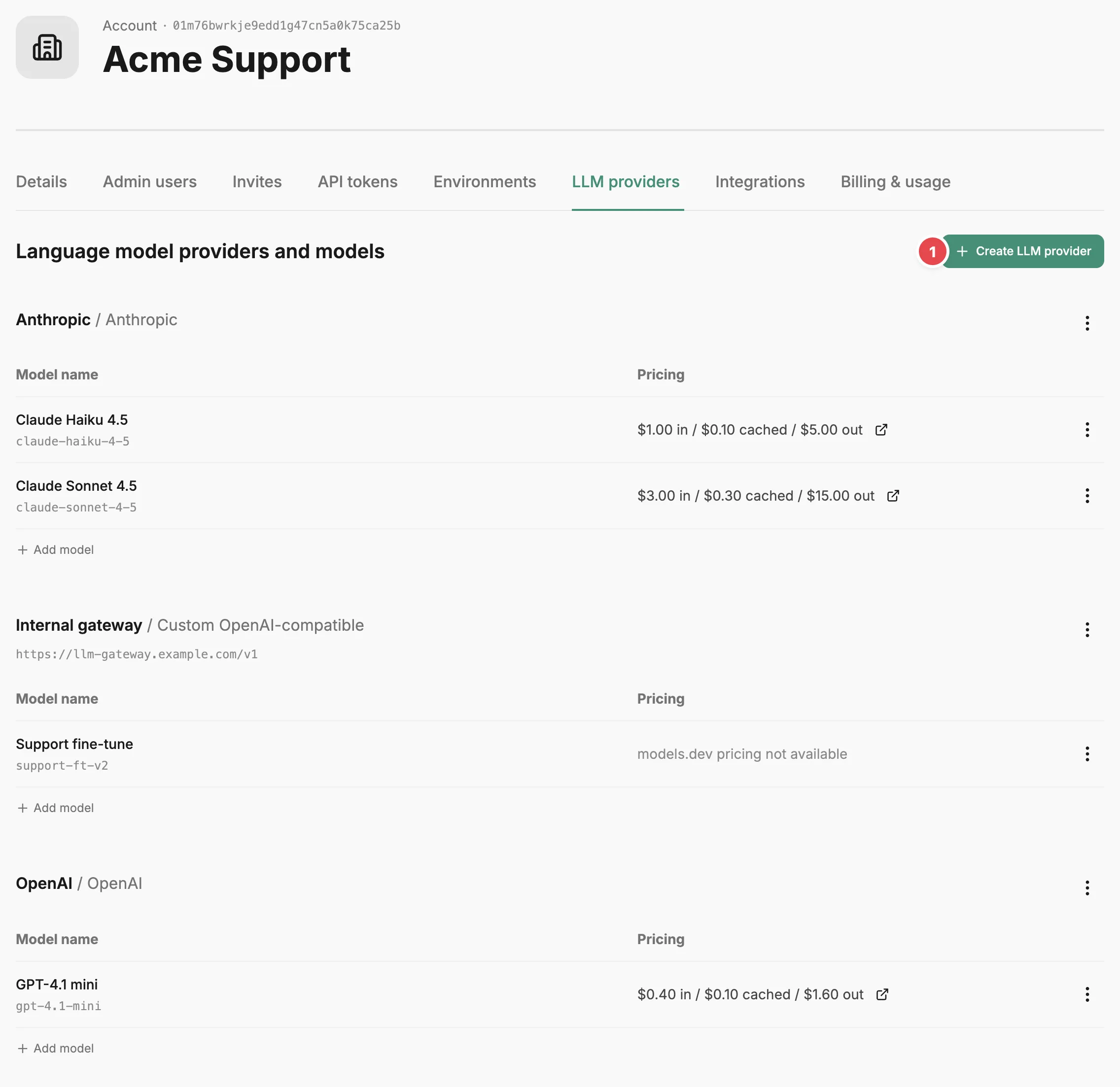
- Create LLM provider - connects a provider with its API key.
Each provider is a section headed with its name and type. A custom provider also shows its endpoint URL. Its action menu has Edit, Add model, Copy ID to clipboard, and Delete. Its models are listed in a table underneath, each with an action menu of Edit, Copy ID to clipboard, and Delete. A model’s Pricing column shows the input, cached input, and output prices published on models.dev when Prefactor can match the model there, with a link out to Models.dev. When Prefactor can’t match a model, the column reads “models.dev pricing not available”.
Select Create LLM provider to add one. Give it a name, which must be unique in the account (case is ignored), choose a provider type, and enter the API key. The types are Anthropic, OpenAI, Ollama Cloud, Together AI, and Custom OpenAI-compatible. A custom provider also asks for an endpoint URL, which must be a public HTTPS address with no query string or credentials in it. The key is never shown again after you save. Edit changes the name, the endpoint URL of a custom provider, or the key; leave the key field blank to keep the current one. The provider type cannot be changed.
Use Add model to attach a model to a provider. It’s in the provider’s action menu and under its models table; a provider with no models also has an Add one link. For Anthropic, OpenAI, Ollama Cloud, and Together AI you pick from the models Prefactor lists for that provider, or choose Custom and type the API name of another model. Prefactor only accepts an API name it can find in the models.dev catalogue for that provider, and fills in the model’s name and pricing from there. For a custom provider you enter a name, the API name the endpoint expects, and optionally the models.dev provider and model name that Prefactor uses to find pricing; set both or neither. Names and API names must each be unique within a provider, ignoring case. Edit on a model changes the same fields.
Delete on a model removes it, and Delete on a provider removes the provider and every model under it. Both ask you to confirm first.
From the command line, the same actions are prefactor llm_providers and prefactor llm_provider_models, each with create, update, and delete.
Related
Section titled “Related”- LLM provider — what providers and models are, and how keys are handled.
- Judge page › Configuration tab — where a hosted judge version picks one of these models.
- Account page — how the Account settings tabs fit together.