

Overview tab
The Overview tab is where you check on an agent in one environment: how many runs are in each state, what it did most recently, and which judges and knowledgebases are attached to it. For the header and the strip above the tabs, see the Agent page.
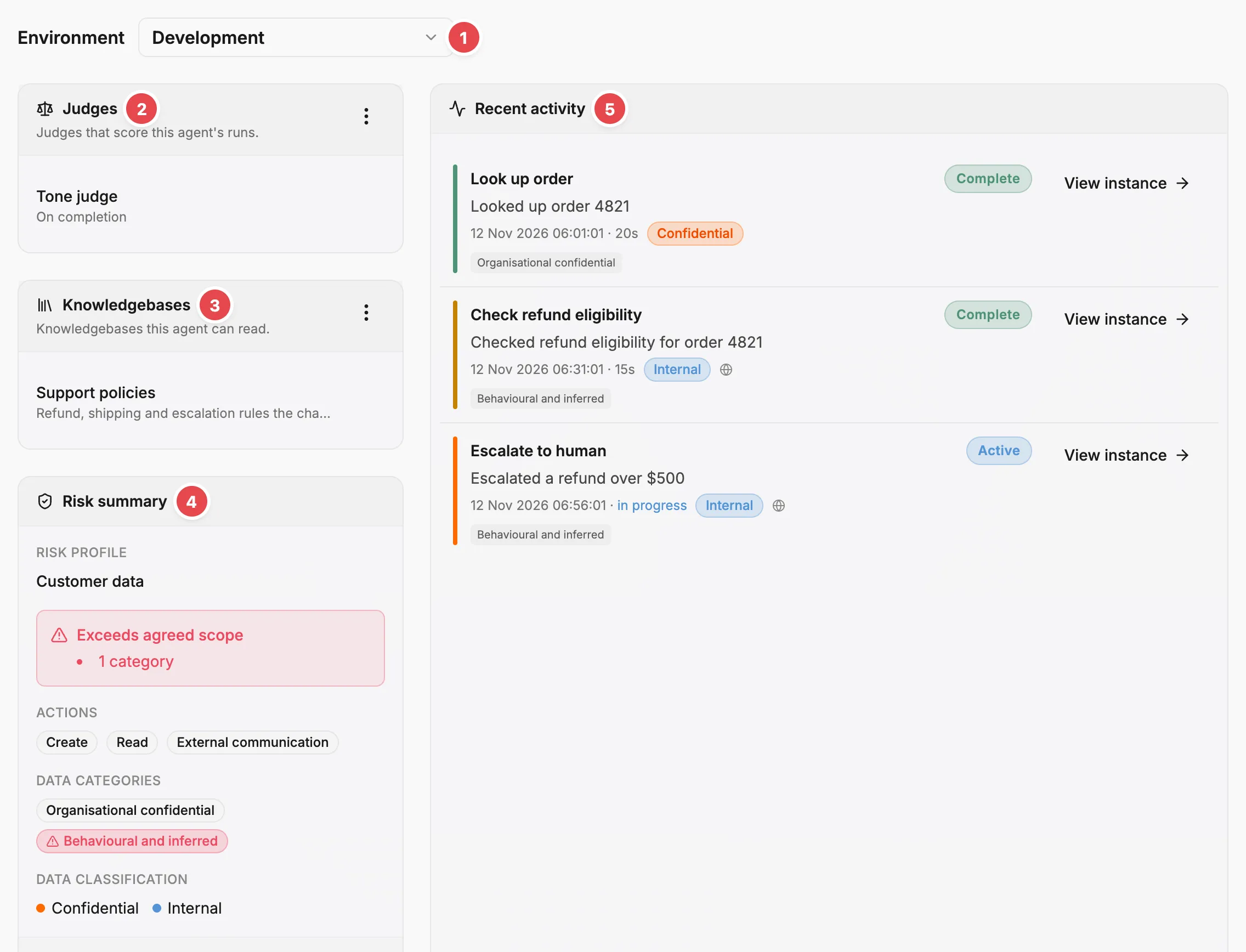
- Environment - picks the environment the tab reports on.
- Judges - the judges that score this agent’s runs.
- Knowledgebases - the documents this agent can read.
- Risk summary - what the schema declares, checked against the risk profile.
- Recent activity - the five latest spans, each linking to its run.
Environment
Section titled “Environment”Environment, at the top of the tab, picks the environment the risk summary, instance counts, and recent activity come from. It starts on a production environment. If you have none, it starts on staging, then testing, then development. The judges and knowledgebases belong to the agent, so they stay the same whichever environment you pick.
A remote agent with no runs yet shows Setup agent above the boxes, which opens the getting started page to continue connecting it.
Judges
Section titled “Judges”The Judges box lists the judges that score this agent’s runs, each with its trigger: On demand or On completion. Add judge, in the box’s action menu, opens a dialog where you choose a judge and a trigger. It is unavailable when no judges are registered or every judge is already attached, and the menu then offers Register judge, which opens the registration form on the Judges page. A row’s action menu has Remove, which asks you to confirm before the judge stops scoring this agent.
From the command line, prefactor agent_associations create adds a judge and update changes its trigger.
Judges only appear here for standard agents. To go the other way and choose agents from a judge, use the Judge page › Overview tab.
Knowledgebases
Section titled “Knowledgebases”The Knowledgebases box lists the knowledgebases this agent can read. An archived knowledgebase stays in the list with an Archived badge. Link knowledgebase, in the box’s action menu, opens a dialog where you choose one. It is unavailable when your account has no knowledgebases, when none of them are active, or when every one is already linked; in the first two cases the menu links to the Knowledgebases page instead. A row’s action menu has Unlink, which asks you to confirm before the agent loses access to that knowledgebase. To manage a knowledgebase’s documents, open it on its Knowledgebase page.
Risk summary
Section titled “Risk summary”When the agent has a risk profile, the Risk summary compares what the agent’s activity schema declares, for the version deployed in the selected environment, against the profile:
- Risk profile — the assigned profile, linking to it.
- Exceeds agreed scope — how many actions and data categories the schema declares that the profile excludes. It only appears when there are some.
- Actions — the actions the schema declares the agent can perform.
- Data categories — the data categories its span types declare.
- Data classification — how many span types sit at each classification level.
View in Activity Schema opens the Activity schema tab to inspect the schema directly.
Instances
Section titled “Instances”The Instances box counts the agent’s runs in the selected environment by state, matching the lifecycle states on the Instance concept:
- Total — all instances, including judge runs still in the Preparing state, which have no count of their own in this box.
- Pending — registered, not yet running.
- Active — currently running.
- Completed — finished successfully.
- Failed or Cancelled — finished unsuccessfully, with the two states combined.
- Terminated — stopped from the platform with a reason.
Recent activity
Section titled “Recent activity”Recent activity lists the five latest spans the agent produced in the selected environment. Each shows the span type’s title, its status, a summary, and its start time and duration. When the agent has a risk profile, a span also shows its highest data classification and up to two of its data categories. View instance opens the Agent instance page for the run the span belongs to.
Related
Section titled “Related”- Instance — what an instance is and how its lifecycle states work.
- Span — what a span records and how span types are defined.
- Evals — how judges, triggers, and judge runs fit together.
- Knowledgebase — what a knowledgebase is and how agents read it.
- Agent page › History tab — the full list of every run over time.
- Agent page › Activity schema tab — span-type definitions and per-type risk cards.