

Configuration tab
A version is a specific release of your agent’s code, and each deployment creates a new one. You’ll come to the Configuration tab to check where a version is deployed, which schema and runtime it uses, and how its recent runs went.
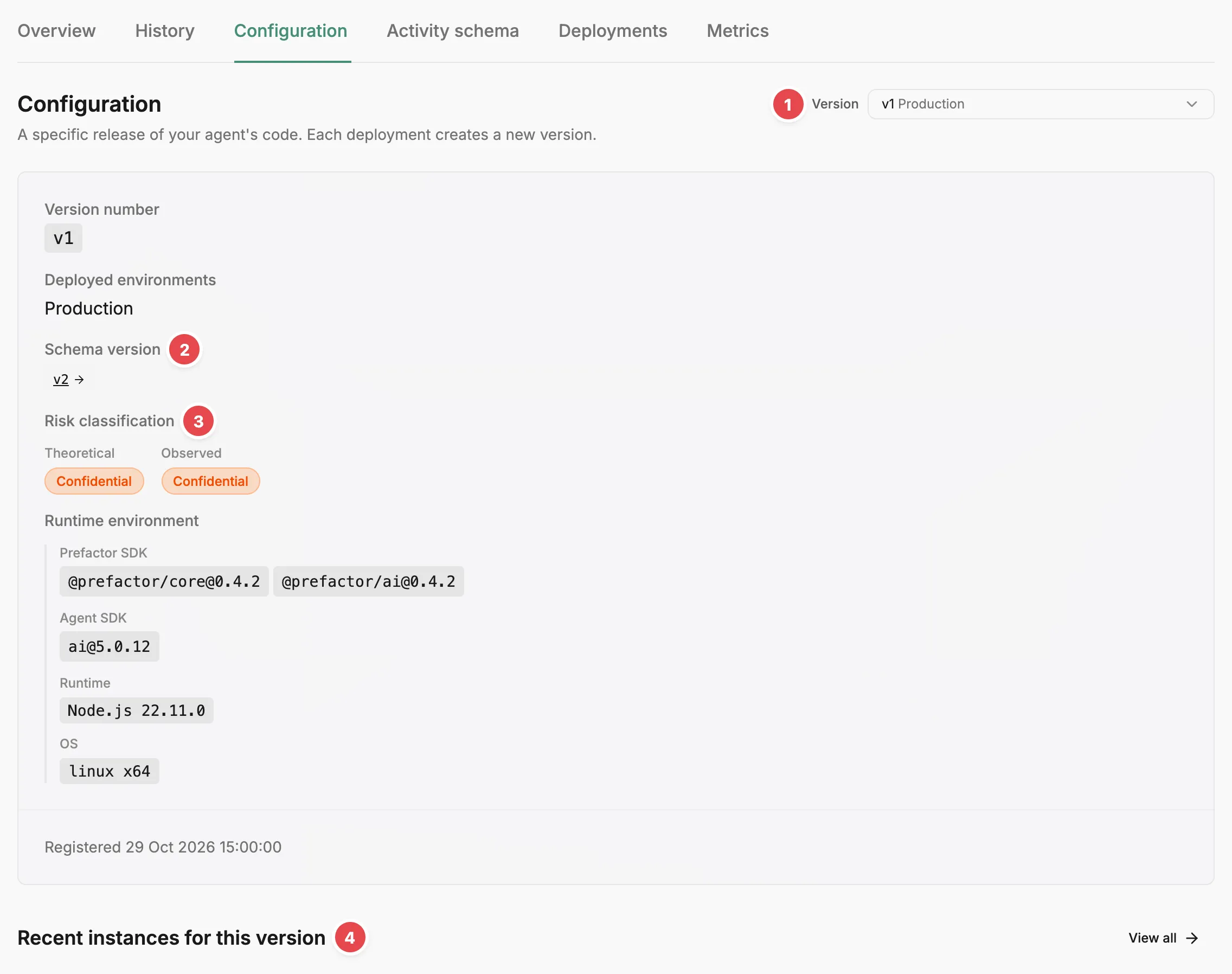
- Version - picks the version the tab shows.
- Schema version - the activity schema this version uses; opens it on the Activity schema tab.
- Risk classification - the highest data classification, declared and observed.
- Recent instances for this version - the latest runs of this version.
Choosing a version
Section titled “Choosing a version”Pick a version from the Version dropdown at the top right. Each option shows the version’s identifier, the environments it is deployed to (or ”- not deployed -”), and when it was created, newest first. When your agent has reported the same identifier more than once, the creation time is added to the name so you can tell the versions apart.
Until you pick one, the tab shows the version deployed to your highest environment, checking production, then staging, testing, and development. If no version is deployed anywhere, it shows the newest version.
Version details
Section titled “Version details”The card for the selected version shows:
- Version number — the identifier your agent reported.
- Deployed environments — where the version is currently deployed.
- Schema version — the activity schema version registered with this version. Select it to open the Activity schema tab with that schema version selected.
- Risk classification — shown only when the agent has a risk profile. Theoretical is the highest classification across every span type the schema declares. Observed is the highest classification across the span types this version’s runs have actually recorded, so it can be lower than Theoretical when some span types never run. Observed reads “No data yet” until a run of this version records a span, and Theoretical reads “Not computed” when Prefactor hasn’t classified the schema yet.
- Runtime environment — shown when the SDK reports it. Prefactor SDK and Agent SDK list the packages and versions in use; Runtime and OS name the language runtime and operating system.
- Registered — when Prefactor first saw the version.
Recent instances for this version
Section titled “Recent instances for this version”The ten most recent instances that ran under the selected version, newest first. The columns are Instance ID, Environment, Status, and Time, with View on each row to open the instance. View all opens the History tab filtered to this version.
Related
Section titled “Related”- Agent — how Prefactor creates versions and what they represent.
- Agent deployment — how a version is pinned to an environment.
- Agent page — the strip above the tabs, including the deployment snapshot.
- Agent page › Activity schema tab — the span types and definitions in each schema version.
- Agent page › History tab — every run of the agent, filterable by version.
- Judge page — the Configuration tab for a judge, where you create and update its versions.